Welcome to ItQLab

How wonderful it is that nobody need wait a single moment before starting to improve the world. ~Anne Frank

IT Support Tips to make a difference in your daily life and provides system enhancement and development services and system maintenance support to endusers, is designed by

Nokia Secret Codes

Posted by Saboor Adem Monday, January 24, 2011 0 comments

I have listed all Nokia secret codes. On the main screen type:

  • *#06# - is used to check the IMEI (International Mobile Equipment Identity).
  • *#7780# - resets to factory settings.
  • *#0000# - shows the software version of your mobile phone.
  • *#9999# - Phones software version if *#0000# does not work.
  • *#67705646# - clears the LCD display(operator logo).
  • *#147# - This lets you know who called you last (Only vodofone).
  • *#1471# - Last call (Only vodofone).
  • #pw+1234567890+1# - Provider Lock Status.
  • #pw+1234567890+2# - Network Lock Status.
  • #pw+1234567890+3# - Country Lock Status.
  • #pw+1234567890+4# - SIM Card Lock Status.
  • *#21# - This phone code allows you to check the number that "All Calls" are diverted to.
  • *#2640# - Displays phone security code in use.
  • *#30# - Lets you see the private number.
  • *#2820# - shows the address of your Bluetooth device.
  • *#62209526# - Display the WLAN adapter's MAC Address.

It is available only for newer devices which support WLAN such as N80.

  • *#746025625# - Sim clock allowed status.
  • #pw+1234567890+1# - Displays any restrictions that your sim has.
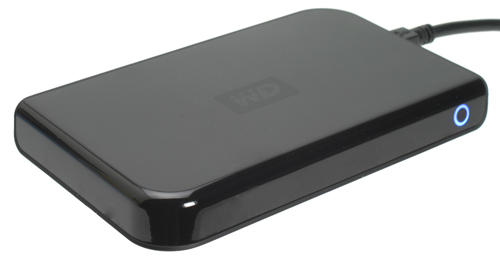
USB Hard Drive-Western Digital Passport

Posted by Saboor Adem Saturday, December 18, 2010 0 comments

Western Digital is most famous for its stupendously good Raptor line of performance hard drives that are generally considered to be the fastest consumer hard drives on the planet. However, it will come as no surprise that it also produces a vast range of other hard drive based storage solutions. And, today I'm looking at probably the cutest one of the lot, a diddy little shiny black portable hard drive known as the Passport.
Just like the 250GB Seagate portable hard drive we looked at a while ago, the Passport is based on a 2.5in notebook hard drive that uses a single USB connection for power and data connection. By doing away with a mains power adapter, these drives are small enough to be slipped into a jacket pocket or a small bag and taken with you anywhere. The Passport is available in 60GB, 80GB, 120GB, 160GB, 250GB, 500GB, and 1TB versions so there's plenty of options if you're on a tight budget.
Some computers aren't able to provide sufficient power over a single USB connection so the use of a special two-to-one USB cable is required. Unfortunately WD doesn't include one of these with the drive so you have to order one separately if needed. You do get a conveniently sized 30cm standard USB cable as well as a quick installation guide, though.
Western Digital clearly has its finger on the design pulse as the Passport is one superb looking device. The glossy black top surface looks as good as ever - piano black certainly seems to be the flavour of the day with Samsung's current line-up of notebooks and the majority of new TVs also sporting this finish - and the matt finish of the bottom creates a perfect contrast. No matter what the fashion industry tries to tell us, nothing will ever truly be the new black.
The perfect shininess of the top is only interrupted by a subtle etched WD logo in its centre and a small blue ring on one of the sides. When the drive is powered up the ring glows a deep shade of blue and flashes a lighter brighter shade as the drive is accessed. Stylish and subtle seems to be the aim of the game and the Passport is playing a blinder.

On its underside the Passport has four little rubber feet that help prevent the drive from sliding around and consequently prevents it picking up too many scratches. However, while the drive may be protected while it sits on your desk, it isn't likely to hold up to the abuses of a portable life.

1st Dual Touchscreen Laptop

Posted by Saboor Adem 0 comments

This tablet has two touchscreens, each with LED backlighting and 1,024 x 600 resolution. You will note the virtual keyboard, and it is billed as "the world's first dual touch-screen Windows mini-notebook PC". It can be used both vertically and horizontally, thanks to a built-in accelerometer. The battery life is good for 2 or 4 hours with high-capacity battery.Other features include Intel Pentium U5400 CPU, 62GB SSD, 2GB RAM, WiMAX, Wi-Fi 802.11 b/g/n, Bluetooth 2.1, Micro SD/SDHC slot, USB port, and Windows 7 Home Premium 32bit.

Xperia X10 vs iPhone 3GS

Posted by Saboor Adem Friday, October 1, 2010 0 comments

iPhone 3GS certainly is the most popular and hottest phone out there is, and with Sony Ericsson set to launch their Android based Xperia X10 in February next year, stage is all set for a yet another battle between an Android set with iPhone. We were obviously excited when Sony Ericsson officially unveiled the specs for Xperia X10, and so we just couldn’t resist, but to perform a head-to-head comparison between Xperia X10 and its contemporary, the iPhone 3GS. So here it is, a comparison chart which attempts to reveal the winner among the two high profile handsets.

As you can clearly see from the comparison chart above, it really drills down to what the end-user wants from his or her phone. If you want a phone with high quality camera, then Xperia X10 is the answer since it boasts of 8.1 megapixels autofocus camera. On the other hand, one clear advantage that iPhone has over Xperia X10 is its huge number of apps offering, which is a big attraction for most users. But when it comes to sheer hardware power, Xperia X10 comes out as a clear winner since it is powered by the monstrous Snapdragon 1 GHz Processor. So it really comes down to what you want from your phone and which platform are you more comfortable with. If you are already sold into the Apple eco-system, then surely iPhone 3GS is the way to go.

Microsoft has introduced high definition web camera

Posted by Saboor Adem Saturday, September 18, 2010 0 comments

There are a few webcams on the market today that offer a widescreen view. This is typically becoming more normal as most television and computer screens are widescreen. The field of view offered by a widescreen picture captures so much more than the alternative. Another major move in almost every aspect of video production now is the move to HD. Microsoft is the first to offer a low-cost webcam with both widescreen and HD capability. The LifeCam Cinema can produce video with a resolution up to 720p. While this is a great move for High Definition recorded video, most programs for video chat over the web don't offer the option to stream in High Definition. For now, this isn't a major setback, as a very top of the line computer is required on both ends, with a high speed internet connection, to achieve any sort of meaningful HD video chat experience. With the release of the LifeCam Cinema, however, I'm positive we are very close to an HD revolution in video chat as well.

Block Unwanted Emails

Posted by Saboor Adem Wednesday, September 15, 2010 0 comments

Do you want to block emails from unwanted ppl? Do you want to block those annoying offers and newsletters that reach your inbox? Well here is a way to block all those unwanted and annoying emails that you do not want to see or read! With this trick you can block individual email address or the whole domain from which you do not want the emails to come from. Here are the step-by-step instructions to do this.
For Gmail
1. Login to your account
2. At the top-right corner, click on Settings
3. Under Settings, click on Filters
4. You’ll now see an option “Create a new filter“, click on it
5. Now in the From field enter the email address from which you do not want to receive the emails
For ex. you may enter sman@gmail.com in the From field to block all incoming emails from this address. However if you want to block the whole domain then use the following syntax: *@xyz.com. Now all the incoming emails from the domain xyz.com will be blocked.

6. Click on Next Step, select the action you’d like to take on the blocked emails. You may select the option Delete it so that the blocked email is moved to trash. To unblock the email, all you need to do is just delete the filter that you’ve created.

For Yahoo
1. Login to your account
2. At the top-right corner, click on Options
3. A drop down menu appears, now click on More options
4. In the left panel select the option Filters and click on create or edit filters
5. Now click on Add6. In the next screen, give a name to your filter and in the From header field enter the email address that you want to block.Fox ex. sman@gmail.com or if you want to block an entire domain then just enter @xyz.com. Dont enter *@xyz.com. Select the option Move the message to: Trash and click on Save Changes.

For Hotmail
1. Login to your account
2. At the top-right corner, click on Options
3. A drop down menu appears, now click on More options
4. Click on Safe and blocked senders link under Junk e-mail
5. Now click on Blocked senders
6. Type in the email address that you want to block under blocked e-mail address or domain field.For ex. Enter sman@yahoo.com to block the individual email address or just enter xyz.com to block the entire domain.That’s it. You no longer receive those annoying emails in your inbox. Keep your inbox clean and tidy. I hope this post helps. pass your comments!

BlackBerry 9800 = iPhone

Posted by Saboor Adem Friday, August 6, 2010 0 comments

The Apple iPhone 4 and the Blackberry Bold 9800 Slider are two of the most anticipated smartphones of 2010, but how do they compare against each other? It’s a case of design versus functionality, with a useful bunch of features thrown in on both handsets. We’ve put the Apple iPhone 4 and the Blackberry Bold 9800 Slider head to head to find out which is the best – join us after the break to find out.
We’ve been wondering which is the best smartphone out of the Apple iPhone 4 and the Blackberry Bold 9800 Slider. One offers an excellent mix of emailing qualities and a fantastic QWERTY keypad, and the other features the best screen seen to date.
However good the text correction software on the Apple iPhone 4 is, there’s no getting away from the fact that Blackberry is the best in the business when it comes to hardware keypads, with the sliding keypad on the Blackberry Bold making it easier than ever to enter text messages and emails. With the choice on an onscreen keyboard or a full QWERTY keypad, it’s impossible not to side with the Blackberry.
The Apple iPhone 4 has shaken up the market when it comes to the display, being the first device to feature a resolution of 960 x 640 pixels. It’s said to be so sharp the human eye can’t pick out individual pixels, making it perfectly suited to browsing the internet or watching HD content. At 360 x 640 pixels, the screen on the Blackberry Bold 9800 Slider may still be capable, but it lags behind the Apple iPhone 4.
if you require on mobile email for work, there’s no doubt about it that the Blackberry Bold 9800 is still the device to have. With full support for business use, and RIM’s much-praised Blackberry Push Email service, you’ll get your mail almost instantly. The Apple iPhone 4 should be a capable understudy, however, and it’s still easy to set up email accounts.
We like the design of the Blackberry Bold 9800 Slider – the curved edges should help it to fit easily in the pocket, and it looks great with the keyboard closed. However, the Apple iPhone 4 is the thinnest smartphone in the world, and the mix of glass and aluminium edging gives it a premium feel. Apple has also given the Apple iPhone 4 a coating to help it resist fingerprints, which should also help it to stand the test of time.
The Apple iPhone 4 wins the internal storage battle, with either 16GB or 32GB depending on which model you opt for, vs 4GB in the Blackberry Bold 9800 Slider. However, the Blackberry fights back with the ability to also take microSD cards, which will make it considerably easier to upgrade the storage and to swap files on the move.
Morever, In Saudi Arabia, and UAE- Blackberry Messenger, Blackberry Email and Blackberry Web-browsing services have been suspended until an acceptable solution can be developed and applied.